Skip to content
English
  • There are no suggestions because the search field is empty.

Purchasing and using credits

In bookaball, you can use credits to book a court. Credits can be purchased directly in the app and used as a payment method for your reservations.

There are two ways to access your credits:

Option 1:

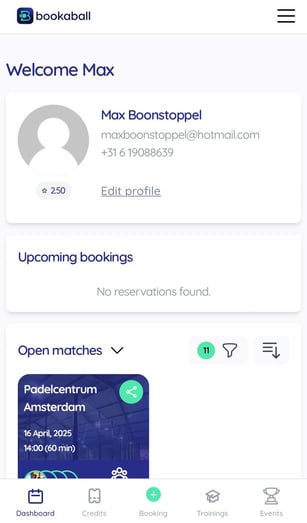
  • In the image below, you’re on your ‘Dashboard’ screen.
  • At the bottom of your screen, next to the dashboard tab, you’ll see the ‘Credits’ tab.
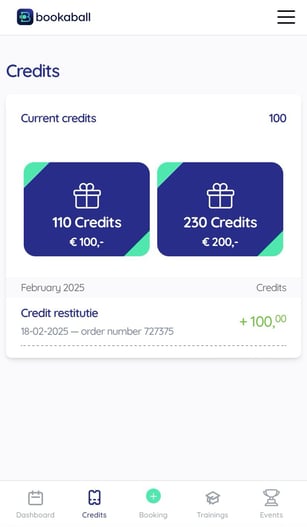
  • Tapping this will take you to the 'Credits' tab.

Here, you can view your current balance — in the example shown, the user has 100 credits, which is displayed under ‘Current Credits’.
AD_4nXfvZvEaxrBVcrba13F3UsCshaB1_-6Qw4TF-Mx2lbuszcoga84nY5Sf0NrdmgUDiIaUW5VJRFt949B-_OafiI28D4JiwTcrmhsMY7ijt2sjC5q3reR8ffsa34xuCu2JC8CBvce2Cg

AD_4nXeY-m6kSEgvUUMQdz9BLYg-pKMHqS1xMKpzwa9Af2xNUUg1PeCscyGFQcKW4oP5EoFZqBsghhofvDO6cFKH7H3pyvsLkk579w9QhKcT1v2u9NUQ77uAhif5GTlt1ELpFoXeaEiKvQ

Option 2:

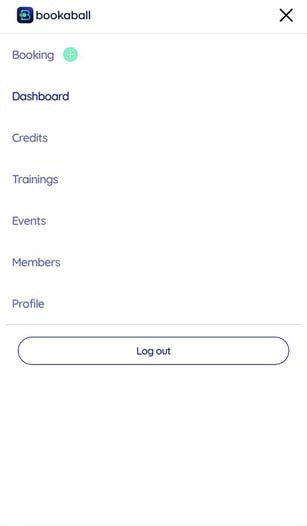
  • Tap the three horizontal lines (hamburger menu) in the top-right corner of the screen (as shown in the image below). you'll be taken to the screen on the right.
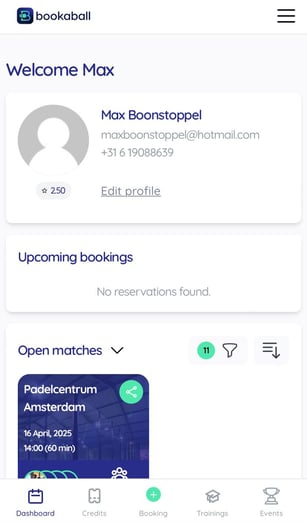
From there, you’ll have access to a menu with several options. Simply tap on ‘Credits’ to view the Credits tab.

AD_4nXfvZvEaxrBVcrba13F3UsCshaB1_-6Qw4TF-Mx2lbuszcoga84nY5Sf0NrdmgUDiIaUW5VJRFt949B-_OafiI28D4JiwTcrmhsMY7ijt2sjC5q3reR8ffsa34xuCu2JC8CBvce2Cg-1

AD_4nXcIqe7lfUqrC0HthgEIRlDnYcaWoZeBApR2qNW1u_I6vJWMS4TnzBefUQdCY8fPb8zNMxe4wKTNx0OiiwWqGHP24sd9mGe2YeIad3ZXtzfoSH3pC2YvmKY_nl2-Uc9FA3UwRhjwTQ

Using your credits for bookings
You can use your credits to make bookings. Here’s how:

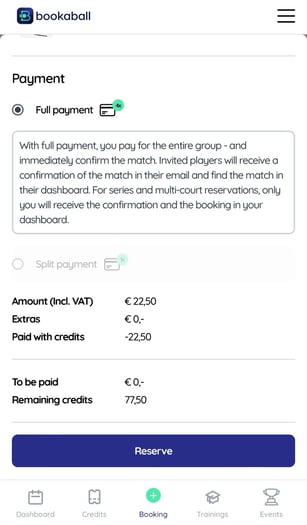
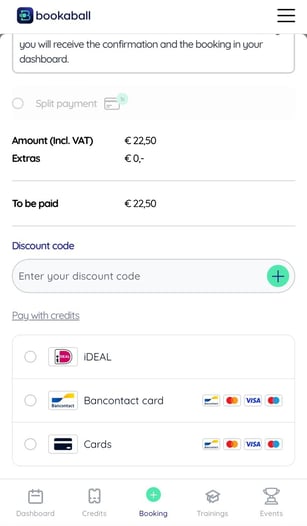
  • In the payment screen (first image below) you’ll see an option labeled ‘Pay with credits’ above the payment methods in grey.
  • Click on this option, and you'll be directed to the second image below.
  • In the example, the booking costs €22,50, which means you will pay this amount using your credits.
Under ‘Paid with credits,’ you’ll see how many credits were used for the booking. You can also check ‘Remaining credits’ to see how many credits you have left on your account.

AD_4nXfrJhFhxDnQXpPjO___YWmiQisFNDsBznmLCAld-9TF4QjgcohQfsT7sOHrjwY87xCLjRjKRsHmS2zbj1nftdGCFta9s_DT56dGFrJeVsoNIgYMUTPTz8WJ9x8FFIThFf79aVCWtQ

AD_4nXe4VGM7JT6DutFcdTilp99stt4ggcE7dBrjxofn9sHjsIYRI3b82JYF8ZyfSvxeC5WOkVQA4Gd5WrHJHwFl_Va-z1Oq90VaI-ZTI8pn7jOWZdzGGDrBkEwKxkFZANnMcQca_6dtMA